

For offices
At the counter, people talk. From today, they can read it too.
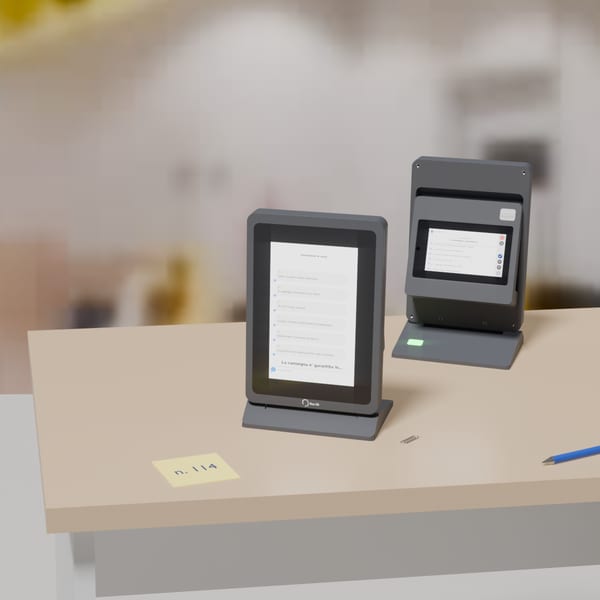
Two screens, one on each side of the counter. What the clerk says appears in writing on both of them as they say it.
The problem
The weak point is the counter, not the person.
At the counter — a municipal office, a hospital reception, a bank desk — the audio channel is where the service breaks: the glass, the room noise, the clerk facing a monitor. Information is repeated, misunderstood, or lost.
The same happens at home, where following a conversation between several people becomes exhausting and the sounds of daily life go unnoticed.
Deaf and hard-of-hearing people already know what they need to do. It is the service that has to adapt, not the person: that is the social pillar of ESG, and it is a legal obligation for the services the European Accessibility Act covers — consumer banking, e-commerce, electronic communications, passenger transport, e-books (Directive (EU) 2019/882, transposed in Italy by D.Lgs. 82/2022, applicable since 28 June 2025). At other counters that directive does not reach: there it is a choice about the service.
At the desk
What actually happens at the desk.
The station is two screens: an 8-inch display facing the person at the counter and a compact one facing the clerk. What the clerk says appears in writing on both screens as it is spoken, a line at a time.
If a passage is unclear, the person taps it on their own screen. The clerk sees it flagged and can read it back, delete it and say it again — the correction happens during the conversation, not after it.
At the end, a QR code sends a structured summary of what was said to the person's own phone, translated into their language. What was only half understood at the counter is there in writing when they get home.
The clerk works as before: press a button to speak. There is no new software to learn.
What it looks like
Designed to be read at a glance.
At the counter the clerk speaks and the words appear in writing, a line at a time. Short lines, meant to be taken in without stopping to re-read, and translated into the visitor's own language when that is what is needed.
This presentation only makes sense with sound: turn it on to hear the clerk.
Read at a glance
The text is laid out to be taken in while the clerk keeps talking: short lines, one thought per line, no paragraphs to wade back through.
In their own language
The person at the counter reads in the language they speak, without having to ask anyone for it.
Correction with one tap
If a passage is unclear, the person taps it on their own screen. The clerk sees it flagged and repeats it: the fix happens during the conversation, not after it.
Push-to-talk
The clerk presses a key to speak. It is a natural gesture, and it keeps room noise and side remarks out of the text, so there is less to correct.
The summary goes with them
The conversation ends with a summary in bullet points, in the visitor's own language: scanned from a QR code, or printed at the desk.
No device to pull out
Nothing to install and no phone to hold: you read it off the screen on the counter.
Two configurations
It fits any workstation.
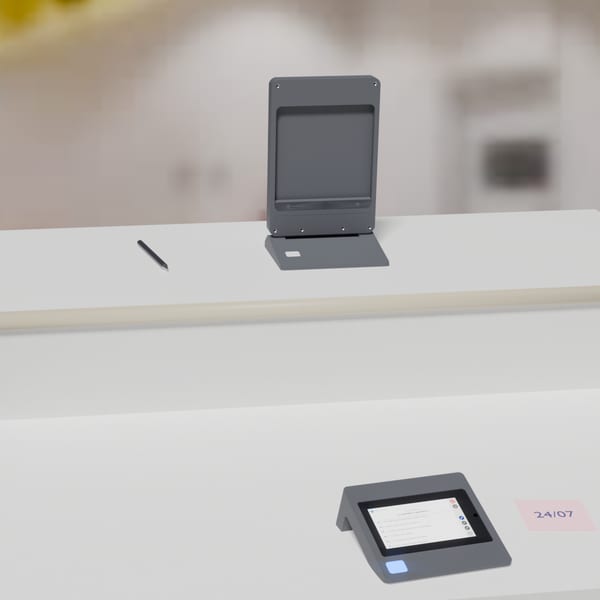
The same hardware, mounted two ways depending on the desk it has to fit.
Configuration 1
Assembled, on the desk
The 5-inch operator module clips to the back of the 8-inch display: one unit, one cable.
The visitor reads at the front, the clerk behind, and speaks by pressing the key on the base.
Configuration 2
Separate, on a two-level counter
The 8-inch display stays on the upper deck facing the visitor; the 5-inch module sits on the clerk's deck.
The clerk uses the key next to their own display, with no leaning over and no turning the screen.
Where it is installed
The places where not understanding has a consequence.
Municipalities and health services
Where not understanding means not accessing a right: residency, benefits, appointments, results.
Banks and post offices
Where a misunderstanding has an immediate financial consequence, for the person and for the institution.
Pharmacies
Where instructions have to be remembered at home, not merely understood at the counter.
The weight shifts with the place
One device, three different uses.
Accessibility, translation and public information: how much each one weighs depends on where the station is installed.
Post office
mostly accessibility
- Accessibility60%
- Translation15%
- Information25%
Airport
mostly translation
- Accessibility10%
- Translation65%
- Information25%
Travel agency
mixed use
- Accessibility15%
- Translation35%
- Information50%
Estimated shares of daily operating time, not measurements. Public information uses the visitor-facing screen only when no conversation is under way, and stops the moment the clerk presses the talk button.

Concept in development
Accessories
HERMENEIA Agorà: following a business meeting, even with a hearing impairment.
A microphone array in the middle of the table and a small display in front of you. Agorà works out who is speaking and from where, gives each person their own colour and writes what they say as they speak. It runs on the same on-premise PC with AI board as the counter station: no inference on the devices and no external service.
- The LED facing whoever is speaking lights up in their colour: you see who has the floor without scanning the table.
- The display shows the speaker's photo, where the voice comes from and their words as they speak, each person in their own colour. Tap a name to see who they are, drag back to reread.
- Audio stays inside the building: the same PC as the counter station does all the work, with no cloud service.
Concept render and film made on a computer, not product footage. The devices are in development: form, size and functions are not final, and they are not part of the current offering.

Prototype in development
Accessories
HERMENEIA Pocket: on the wards, in outpatient clinics, at the pharmacy.
In clinics and hospitals, conversations do not always happen at a counter. A pocket device with an electronic-ink screen takes the same transcription and translation wherever they are needed: the speaker holds it, the listener reads their own language on the part of the screen facing them. Like the counter station it runs no inference of its own: it relies on the same on-premise server.
This presentation only makes sense with sound: turn it on to hear the clerk.
Concept film made on a computer, not product footage. The device is in development: form, size and functions are not final, and it is not part of the current offering.
Privacy
Processing happens where the conversation happens.
In the office: on the on-premise server. Our devices connect to a server on the building's local network, and all inference runs there. One server drives two to six stations; a busier counter hall gets a second one.
No audio, video or text leaves the building. No internet connection is required.
The end-of-conversation summary is handed to the person — downloaded from the QR code or taken away printed — and is not kept: it stays on the server inside the building only for as long as the handover takes.